Reviewed · TOKYO TOURS
Japan: eSIM with Unlimited Local 4G/5G Data
The best thing about this Japan eSIM is simple: you can land in Japan with local 4G and 5G data ready to go, without hunting for a SIM shop or swapping a tiny plastic card. Scan the separate QR code, connect after arrival, and use your phone for maps, train information, translation, and messaging.
I like the choice between unthrottled Ultra data and the cheaper-feeling Lite option with speeds capped at 10Mbps. I also like that hotspot sharing is available, and the service has worked well for some users even on subway journeys. The catch is that this is data only, and the setup can cause confusion if you scan the wrong QR code or use a phone that is locked or not eSIM-compatible.
Key points before you buy
- Two KDDI (au) plans: Ultra offers unlimited 4G and 5G without throttling, while Lite limits maximum speed to 10Mbps.
- The real eSIM QR code arrives separately: GetYourGuide’s voucher QR code is not the installation code. Expect the eSIM code by email one day before your activity date.
- No physical SIM card is needed: Install the eSIM before departure, then wait for it to connect to the Japanese network after you arrive.
- Plans run for calendar days: A connection at 10 p.m. counts as the first full day by midnight, so late-night activation can shorten your practical use time.
- Hotspot use has limits: Depending on your plan and duration, hotspot allowances range from 3GB for three or four days to 30GB for a 30-day plan.
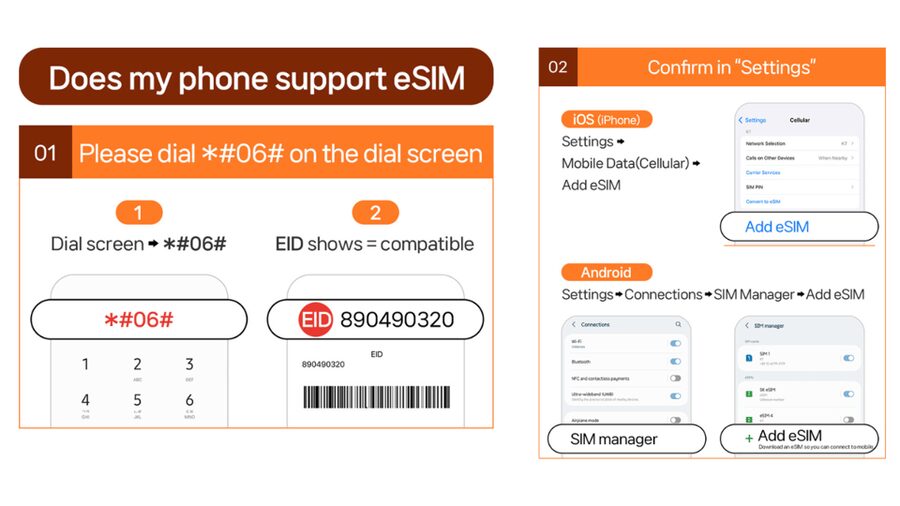
- Your phone must be unlocked: Check for an EID by dialing #06# and confirm that your device accepts a foreign eSIM before purchase.
What this Japan eSIM actually gives you
This is a mobile data plan for Japan, using the KDDI (au) network. It covers Japan, including Honshu, and connects to local 4G or 5G service after you arrive.
You do not receive a Japanese telephone number. Voice calls and SMS messaging are not included, so you will use internet-based services for communication. Apps such as messaging platforms, email, and internet calling can work over the data connection, but ordinary cellular calls and text messages are outside the plan.
For most visitors, data is the useful part anyway. You can check train directions, translate menus, look up opening hours, book taxis through apps, and send messages without relying on hotel Wi-Fi. Japan’s rail system rewards having directions in your hand, especially when you are changing lines or trying to identify the right station exit.
The service is sold for $10 per person, though the final price can vary by the plan and number of days selected. At that price, the main question is not just how cheap the eSIM looks. It is how much data you need, how many days you need it, and if you want to share your connection with another device.
A few more Tokyo half-days to weigh up
- Mt Fuji and Hakone 1-Day Bus Tour Return by Bullet Train
★ 5.0 · 26,383 reviews - 1-Day Tokyo Bus Tour
★ 5.0 · 14,250 reviews - Tokyo: TOKYO SKYTREE® Admission ticket
★ 4.5 · 11,192 reviews
Choosing between Ultra and Lite
The Ultra plan provides unlimited local 5G and 4G data with no throttling. That makes it the stronger choice if you expect heavy use, such as frequent video streaming, regular uploads, large downloads, or long periods of navigation and hotspot use.
The Lite plan also provides unlimited local data, but maximum speed is capped at 10Mbps. That is still enough for ordinary travel work: maps, websites, translation tools, email, social messaging, and many standard video calls. You may notice the limit more when several devices share the connection or when you try to stream high-resolution video.
Lite is available for three to 10 days. Ultra can be selected for three to 30 days. This makes Ultra the only practical choice for a longer trip, since the Lite option stops at 10 days.
The word unlimited needs a little care here. For Lite, unlimited refers to the amount of local data, while the speed remains limited to 10Mbps. Hotspot use also has a separate allowance. The published hotspot figures are:
- Three or four days: 3GB
- Five days: 4GB
- Six days: 5GB
- Seven days: 6GB
- Eight days: 7GB
- Nine days: 8GB
- Ten days: 9GB
- Fifteen days: 15GB
- Twenty days: 19GB
- Thirty days: 30GB
The information provided does not clearly assign every hotspot figure to a specific plan, so I would treat these as the listed tethering limits and check the option details before paying. If you only need data on your own phone, this restriction may never matter. If you plan to connect a laptop or a companion’s phone, it matters a great deal.
Installing the eSIM before you leave
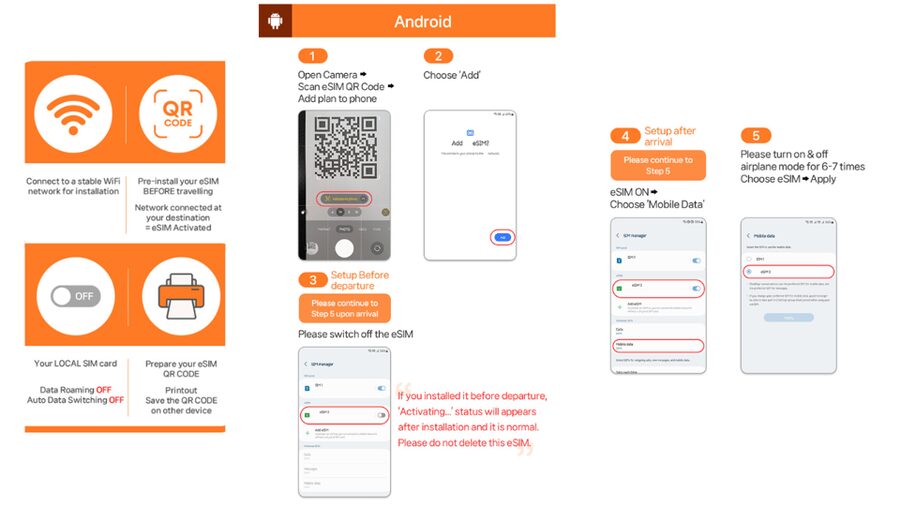
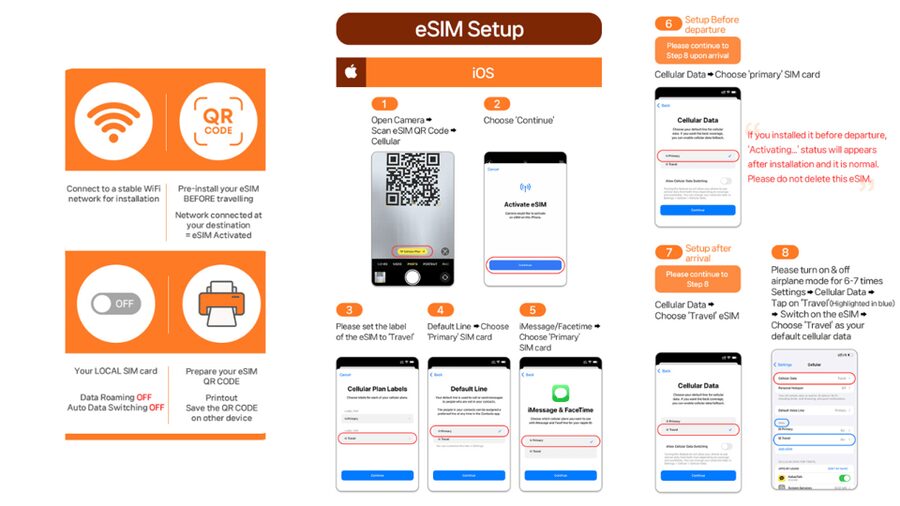
The QR code process is easy once you know which code to use. The QR code on your booking voucher is not the eSIM installation code. The actual eSIM QR code arrives separately by email one day before the activity date.
That timing is important. Do not wait until you are standing at the airport with a weak Wi-Fi connection. Install the eSIM while you still have reliable internet, follow the setup guide, and leave it ready on your phone before departure. The eSIM QR code must be installed and activated within 30 days of purchase.
Installing it before your trip does not mean it starts counting immediately. The eSIM connects to the KDDI network after you arrive in Japan. This lets you prepare in advance without using up the service during your flight or at home.
You should also check that your phone is unlocked for a foreign SIM or eSIM. A phone can support eSIM technology but still be locked to its home network. If it is locked, the Japanese plan will not work.
To check basic eSIM support, dial #06# on your phone. If an EID appears, the phone supports eSIM. If no EID appears, it is not compatible with this type of plan. You should also compare your phone with the supported-device information shown in the product photos before purchasing.
Your first connection after landing in Japan
The service activates when it connects to the KDDI (au) network in Japan. You may need to select the new eSIM for mobile data and make sure the relevant data settings are enabled.
A common mistake is assuming that a message saying QR code is invalid means the installation failed. The instructions specifically advise checking your phone settings first. On an iPhone, go to Settings, then Cellular. On an Android phone, go to Settings, Connections, then SIM Manager. Look for a newly added eSIM.
This is a good reason to keep the supplier’s email or WhatsApp contact available. If the eSIM appears in your settings but does not connect, contact the supplier for help rather than repeatedly scanning the code.
Your first day deserves special attention because the duration is calculated by calendar days. If you activate at 10 p.m. Japan time, that counts as one full day by midnight. For a short three-day plan, a late arrival can eat into your useful time. If your flight lands near midnight, choosing a plan with an extra day may be sensible.
Same base, a completely different sort of day:
- Tokyo: teamLab Planets TOKYO Digital Art Museum Entry Ticket
★ 4.6 · 9,779 reviews - Mt Fuji & Hakone Cruise, Drum Show Bullet Train 1 Day from Tokyo
★ 4.0 · 7,413 reviews - Tokyo: Sumo Show Experience with Chicken Hot Pot and a Photo
★ 4.8 · 6,678 reviews - Tokyo: Shinjuku Food Tour (13 Dishes at 4 Local Eateries)
★ 5.0 · 6,603 reviews
How useful is KDDI coverage?
The service uses KDDI (au), one of Japan’s local mobile networks. The stated coverage area is Japan, and the plan is designed for local 4G and 5G access rather than roaming through your home carrier.
The practical benefit is quick access when you are moving around. You can pull up directions while walking, check train information on the way to a station, or translate something at a shop without first finding a public network. One reported setup worked even on subway journeys, which is useful in cities where much of your day takes place below street level.
Still, no mobile service promises a perfect 5G signal in every place. The instructions note that indoor locations, underground areas, and crowded places can affect 5G reception. Your phone may switch to 4G, and that is normal. A 4G connection is often perfectly adequate for maps and messaging.
Do not judge the plan only by the 5G symbol. The key question is if you can get useful data where you need it. The available information points to good practical coverage, while also making clear that signal type and speed can change with your location.
Using your phone for daily Japanese travel
This eSIM is most valuable when you use your phone as a travel tool rather than as a small television. Japan’s train networks can be confusing at first, with multiple operators, platforms, exits, and station buildings. Having data lets you check the route again when you take a wrong turn.
Translation is another strong use. You can look up signs, menus, and short phrases as you go. Internet access also helps with reservation details, digital tickets, weather checks, opening times, and finding an address when a street number is not easy to spot.
Messaging is included through data services, but regular SMS is not. If a booking or account requires a text message sent to your home number, this plan will not replace that service. Keep your usual SIM active only if you understand how your carrier charges for roaming, or use another method for receiving important messages.
Because the plan has no voice number, it is not designed for ordinary phone calls. That is a small issue for many visitors, but it should be part of your decision if you need standard calling.
Hotspot sharing and the fine print
Tethering is supported, so you can share the connection with another phone, tablet, or laptop. That is handy when one person in a group has the eSIM and everyone needs a quick map check.
The restriction is the amount of hotspot data. The listed allowances are much smaller than the unlimited phone data, especially on shorter plans. A three or four-day option has 3GB of hotspot data, while a 30-day option has 30GB.
That should cover occasional map use, messages, and light browsing on a second device. It may not cover constant laptop work, large file transfers, or repeated video streaming. If you need a full-time work connection, Ultra is the safer speed choice, but the hotspot allowance still deserves attention.
I would use the eSIM primarily on the phone that holds the plan. Share it when needed, but do not assume that unlimited personal data means unlimited tethering.
Price, flexibility, and refund rules
At $10 per person, the eSIM can offer good value for a short visit, especially if you would otherwise pay daily roaming fees from your home carrier. It also saves you the time and fuss of buying a physical SIM after arrival.
The flexible booking terms are helpful. You can reserve and pay later, and cancellation is allowed up to 24 hours in advance for a full refund. There is one important cutoff: once the eSIM QR code has been sent, refunds are not accepted.
That makes device checking essential before you buy. Confirm eSIM support, confirm the phone is unlocked, and choose the right duration before the code arrives. The cheap price is less attractive if the phone cannot use the plan.
For a longer trip, compare the cost of a 15, 20, or 30-day Ultra plan with your carrier’s roaming package. For a very short stay, Lite may be enough if you are comfortable with the 10Mbps speed cap and do not need much hotspot data.
Who should choose this eSIM?
I would recommend it to you if you want a simple data connection and are comfortable doing a small amount of setup before departure. It suits independent visitors who rely on maps, translation, train information, messaging, and web searches.
It is also a good fit for people who dislike swapping physical SIM cards. You scan the code, keep your normal SIM available if appropriate, and use the Japanese eSIM for data after landing.
The Ultra option makes the most sense for heavy data users, longer stays, or anyone who does not want to think about speed limits. Lite suits shorter trips and ordinary phone use, provided 10Mbps is enough for you.
I would hesitate if you need a Japanese telephone number, standard SMS, or guaranteed full-speed hotspot use. I would also avoid buying until you have checked compatibility, since the refund protection ends once the QR code has been issued.
Is this Japan eSIM worth booking?
Book it if your priority is reliable local data with minimal airport fuss. The QR installation is straightforward when you use the correct code, and the KDDI connection gives you a practical way to stay online around Japan.
Choose Ultra for unthrottled speed and trips of up to 30 days. Choose Lite for three to 10 days if maps, messaging, translation, and normal browsing are your main needs. Before paying, check the EID, unlock status, duration, calendar-day rule, and hotspot allowance.
For $10 per person, this is a useful travel tool, not a complete phone replacement. It gives you data, not calls or texts. If that matches how you use your phone abroad, it is a sensible addition to a Japan trip.
FAQ
Does this eSIM include unlimited data in Japan?
Yes. Both options include unlimited local 4G and 5G data. Ultra has no throttling, while Lite has a maximum speed of 10Mbps.
What is the difference between Ultra and Lite?
Ultra provides unlimited 5G and 4G data without throttling and is available for three to 30 days. Lite provides unlimited data at speeds up to 10Mbps and is available for three to 10 days.
Does the eSIM include voice calls or SMS?
No. Voice calls and SMS messaging are not included.
When will I receive the eSIM QR code?
The eSIM QR code is delivered separately by email one day before the activity date. The QR code on the booking voucher is not the eSIM installation code.
When does the eSIM start working?
It connects to the local KDDI (au) network after you arrive in Japan.
How long is the QR code valid?
The eSIM QR code must be installed and activated within 30 days of purchase.
How can I check if my phone supports eSIM?
Dial *#06# on your phone. If an EID appears, your device supports eSIM. You should also check that the phone is unlocked for a foreign SIM or eSIM.
Can I share the connection with another device?
Yes. Hotspot sharing is supported, but tethering has limits depending on the selected plan and duration.
Can the eSIM connect to 5G everywhere?
No. Indoor areas, underground locations, and crowded places can affect the 5G signal. Your phone may switch to 4G.
What should I do if the QR code says it is invalid?
Check Settings, then Cellular on iOS, or Settings, Connections, then SIM Manager on Android, to see if a new eSIM appears. If you still have problems, contact the supplier by email or WhatsApp.
Just added around Tokyo
- Narita Airport(NRT): Private Transfer to Tokyo/Yokohama 1-9pax★ 5.0 · 47 reviews
- Private Transfer from Narita Airport to Yokohama Port and City★ 4.5 · 17 reviews
- Private Arrival Transfer : Narita International Airport to Central Tokyo City★ 4.5 · 12 reviews
- [Narita Airport Terminals 1, 2] 40-60km Sawara Itako Historic Bike Tour★ 5.0 · 13 reviews
- 3 Day Japan Highlights Tour: Tokyo, Mt.Fuji, Nara, Kyoto, Osaka★ 5.0 · 22 reviews
- Small Town in the Big City: Tasting Tokyo’s Kichijoji★ 5.0 · 195 reviews
- Small Town in the Big City: Tasting Tokyo’s Kichijoji★ 5.0 · 16 reviews
- The 10 Tastings of Tokyo With Locals: Private Street Food Tour★ 5.0 · 48 reviews
Tokyo Tours, compared.

Mt Fuji and Hakone 1-Day Bus Tour Return by Bullet Train
Read our review →

teamLab Planets TOKYO Digital Art Museum Entry Ticket
Read our review →
Mt Fuji & Hakone Cruise, Drum Show Bullet Train 1 Day from Tokyo
Read our review →
Sumo Show Experience with Chicken Hot Pot and a Photo
Read our review →
Shinjuku Food Tour (13 Dishes at 4 Local Eateries)
Read our review →
Tokyo Mt Fuji 5th St & Hakone Cruise Bus Tour w/Bullet Train
Read our review →